Saturday, 21 May 2016

Social Network analysis 2- informative but fun

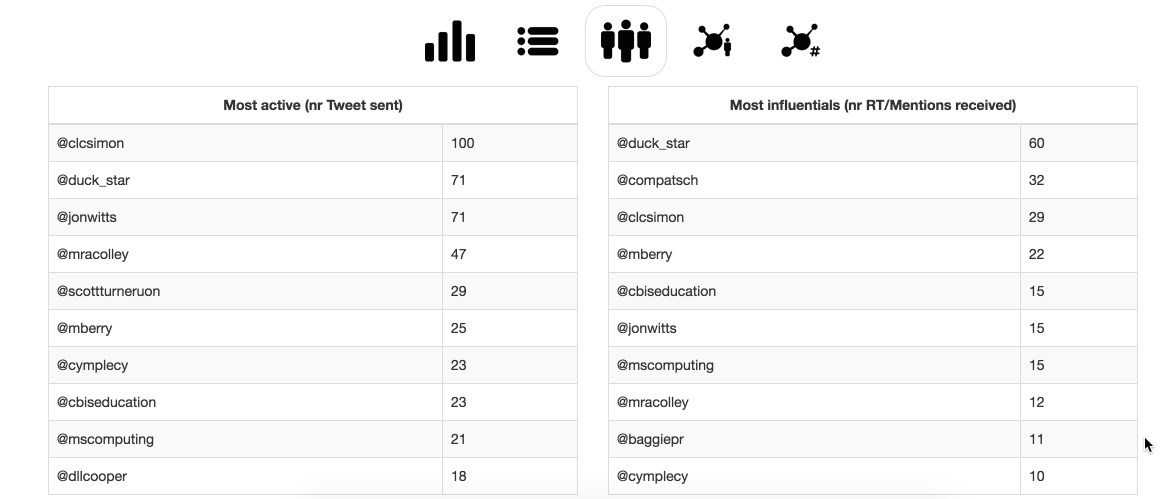
Previously I have been playing with a piece of Social Network Analysis software Socioviz.net and some the results can be seen in an earlier post (http://scottjturnerranting.blogspot.co.uk/2015/12/social-network-analysis-fun-and.html).

This week I have been playing with another free Social Network Analysis software  - TAGs from Martin Hawksey (Twitter: @mhawksey). 
The software is available from https://tags.hawksey.info/ and provides, among other things, a way of collecting Twitter data into a Google Sheet document via a template. How it is set up is on the site (https://tags.hawksey.info/) and especially useful is the video  on the site, that I have also embedded below.


As an experiment I was curious about the network of twitter users using the hashtag #CCUKchat this week; so it seemed like a good opportunity to try it. The filled in template for this task (after the set-up procedure is completed) is shown below, it was then run (an option that is found in the TAGS pull-down menu that will have been created during the set-up operation).
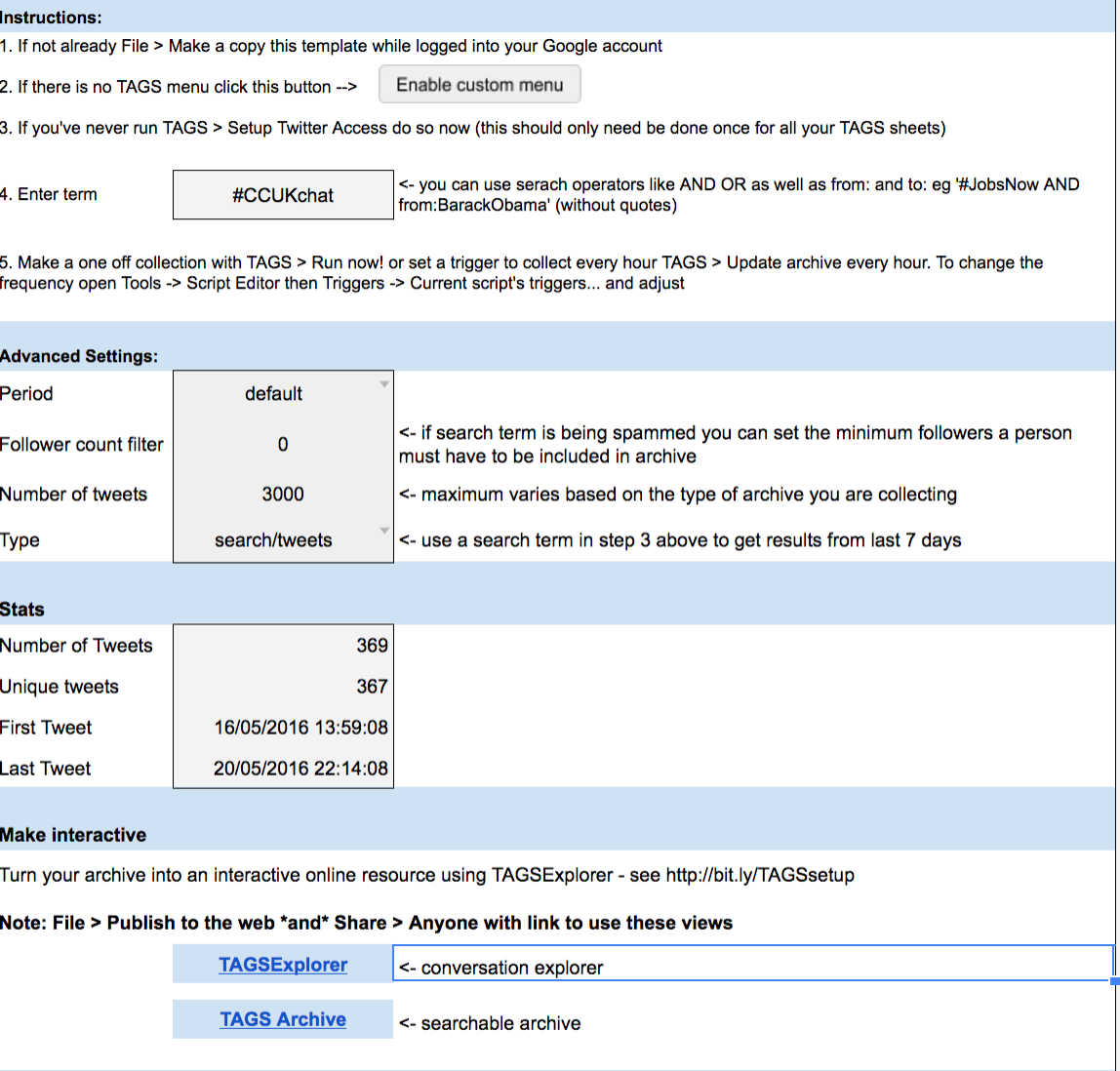


At the bottom of figure above you see two buttons at the bottom of the page, clicking on the one marked TAGSExplorer you get a URL which takes you to an interactive page with the network shown.


Clicking on retweets produced


I am still getting my head around what these show or mean. One of the tools included that is helpful can be found back in the google sheet. Under the  TAGS pull-down menu, there is an option to create a Dashboard which is an another sheet, an example is shown below.

It is informative. To add a bit of context #CCUKchat is a tweetchat that took place on the 18th May 2016 20:00-21:00 BST. The results show the spike and then a lower-level of usage after for a few days.

This is a piece of software I will be exploring more and would encourage others to have a go with themselves. There are lots of option to explore both in the template but also on the interactive network graph.


Related posts

Mapping Tweetchat #caschat over a week

Tools than can be used to create network graphs of twitter data.


All views are the authors only and do not represent those of any organisation the author may be associated with.

Saturday, 2 April 2016

Experiences with curation tools.

What does curation software mean?
The number of resources on the internet is increasing in most areas and search engines can are helpful but it is not the same as someone telling you this is a good resource. Digital curation takes this further allowing people to produce lists of internet resources that can be dynamically updated but filtered resources - if you like a dynamic reading list of web resources.

A slideshare overview.


Two free example tools are shown below Scoop.it and paper.li

1. Scoopit(http://www.scoop.it)


Two examples sites used in my teaching are shown here:
artificial intelligence for students


Robot resource


The good feature of scoop.its is you have control over what content you present, you are the filter. Content suggestions are also made, but it is up to you if you select them. The aim is to increase the amount of student suggested content. 


2. Paper.li (www.paper.li)

Allows you to set up a newspaper-like resource that takes feeds from blogs, rss feeds and if you want Twitter. Unlike scoop.it you have control over the feeds you choose but less control over the content displayed; so careful selection of the feeds is needed


Twitter
This is a quite a good system of curation by using a hashtag (e.g. #csy3025 the name of a module) you can mark-up content. It is easy and anyone contribute - that has advantages and disadvantages. Finding the curated material doesn't involving have a twitter account just a google search will find it (https://twitter.com/search?q=%23csy3025). But, you have no control over others using the hashtag anyone can use it and add their own content.


Google Docs.
This provide a good tool for an in-class activity. As an example students can create a single wiki-style resource on a topic by giving them all access to the resource for editing and then only allowing viewing access after the class. Nice, easy task that as the tutor you can contribute to as well. Now for the but; there is a danger that one or two people can investigate what happens if they delete it all - in three years this only happened once- it is relatively easy for you recover from but upsets the other students when it happens.


I am recent convert to using this tool. Adding resources into subjects by pins as below. Nice tool, very graphical showing a lot on one page.


Summary

A lot of the choice of the tool comes down to personal opinion and the role it is to play. It is worth remembering though; the use a tool is not mutually exclusive though. These often can be linked through tools such as twitter. There are many tools missing from this list; a notable one is Facebook, this can be used as well with it's pages, but I have not used in this way so I haven't included here.

An example of what other universities are doing in this area can be found at Curtin University.

Wednesday, 23 March 2016

Mapping Tweetchat #caschat over a week

Using socioviz.net looked at the use of a particular weekly tweetchat hashtag #caschat over a one week period 16th March 2016 to 22nd March 2016. The chat happened on 22nd March 2016 discussing Robots in Teaching.


The table above (and the graph below) give an indication on the active use of the hashtag during the week, along with the level of engagement from others shown in the influence score.


 The above figure shows all those who used the hashtag or were referred to in tweets using the hashtag during the week. A large central group and smaller outlier groups.


Focusing of the central group, I would suggest there is different behaviours occurring. One of which  in the centre there is a central discussion very interconnected; apart from this there may be spun off conversations happening as well. The 'leaves' on the outside are mostly likely to people being mentioned but with some evidence that some then get involved.


Monday, 14 March 2016

Let’s Talk about Raspberry Pi 3. #BSW2016

Originally posted as 

British Science Week: Let’s Talk about Raspberry Pi 3. #BSW2016 https://medium.com/@UniNorthants/national-science-week-let-s-talk-about-raspberry-pi-3-nsw2016-fbf6834b25c#.iwi50jpdd


Imagine this scenario: Sarah walks into the ICT suite, and sits down in front of a screen, keyboard and mouse and a few cables. She opens her bag and pulls out a small plastic box around the size of large match box and plugs in the cables, one each for the monitor, the keyboard, mouse and lastly the power leads to the box. One the screen after a few seconds the screen changes and she is ready to work on her coursework on the word-processor and do some searching, because this box has already connected to the wireless network.
The new Raspberry Pi 3 is exciting, but mainly because it is a Raspberry Pi and plays a huge part in what this means for the future of computing.
In the last few weeks, the scenario above took a giant step forward to being a reality with the release of Raspberry Pi 3 from the Raspberry Pi Foundation. A matchbox size computer for under £35 means that a truly personal computer is possible; one for each student or even as an alternative to shared PCs. The downloadable software used for Raspberry Pi includes the basic things most people need such as word-processing, spreadsheets, browsers, etc, and all for free.
Raspberry Pi has been around for four years now, but what puts the new Pi model a step ahead are two fundamental things:
1) Its wireless and Bluetooth connectivity are built into one for the first time
2) The processor is getting closer to that of laptops and desktop computers
Ok, so am I suggesting that schools throw out their current computers? No not for a moment.
When the time comes to renew them though, perhaps considering the advantages and disadvantages of a £30 computer instead or in the extreme scenario above, one £35 computer per student is worth considering.
The technical aspects alone are a good reason to make a Raspberry Pi 3 purchase, but in my opinion it would be the Raspberry Pi Foundation itself and it’s community that are the real advantage. The Foundation’s stated goals are “…to advance the education of adults and children, particularly in the field of computers, computer science and related subjects.”
The Foundation also owns the Code Club; a network of volunteer-led, after-school coding clubs which are committed to training teachers in computing and training on how to use Raspberry Pi through a two-day course called PiCademy.
The ace up their sleeve is that they have the support of a relatively large community of hobbyists who play with Raspberry Pi for their own fun and have a culture of sharing ideas, projects and providing support to each other. In my view this is the ‘secret sauce’; the teachers and hobbyists in the community provide and share resources very openly.
As an example, a new resource for using Raspberry Pi in science classes was recently made available and like most resources this has been produced by one or more hobbyists. One further example is the idea of PiJams; where anyone interested in finding out more or sharing what they are doing can come along and take part.
With these fantastic events in mind The University of Northampton is hosting the first Northamptonshire Raspberry Jam on the 16 April 2016. Register for free and share your knowledge or learn something new!

Saturday, 27 February 2016

Are we going to lose jobs to the 'robots'

No one knows for definite, we are getting some extreme views on both sides – from slaves to the robots to robots as slaves to us. The answer, like a lot of things, is probably somewhere in the middle, but there will be change. There are those who are calling this a fourth industrial revolution (Schwab, 2016 see the link at the bottom); there is probably a lot of truth in this, the German government is looking at Industrie 4.0 announced in 2011 integrating ICT with industry - the videos from various organisations below can explain this more easily than I can.


We can see changes around us in the way we buy things, booking holidays on-line, ordering groceries online and the rise of Amazon to buy goods as well as books.


IBM Watson

By Clockready (Own work) [CC BY-SA 3.0 or GFDL], via Wikimedia Commons


Is my job is safe? 
Arguably traditional automation has replaced low skilled or 3 Ds jobs (dirty, dangerous and demanding physically), but what about now? There  seems to be a suggestion that the more creative jobs would be safer from automation and that the retail and administrative jobs are at risk.  So are medical staff and legal professional safe? Short term probably, but systems such as IBM’s Watson are making that a little more uncertain. So is it this creative bit that makes the difference? Well that is being weaken by the ‘robotic’ article writers than are starting to appear, and being published, to a certain extent there maybe some overlap with the legal role, through the requirement of presenting evidence in the most effective way for its audience.


Medical staff must be safe surely, well DaVinci robots (see below) have been around for a while now under the control of a surgeon but what next? There is a long history of expert systems in medicine are they going to get better (no pun intended), systems such as  Watson seems to use yes.


  • Medical Illustration, Wellcome Images
  •  
  • Copyrighted work available under Creative Commons by-nc-nd 4.0, see
  • http://creativecommons.org/licenses/by-nc-nd/4.0/


  • Well perhaps this looks bleak, but  is that because we are in middle (or even the start) of this revolution? Personally I think we will see different roles and roles being redefined; perhaps the ‘robot’ will be the assistant helping to provide the information or sifting the information a bit but final decision will be in human hands. What will happen is change - roles will change, so perhaps the key is think flexibly; to stop demonising these things and think how we can live with the changes.


    The opinions are the author's and do not reflect necessarily the views of any organisation the author has any association with.


    Monday, 22 February 2016

    code into 3d images

    In a recent online article on the CreativeBloq (http://www.creativebloq.com/web-design/codeology-web-app-turns-code-3d-art-21619365) a new piece of software Codeology (http://codeology.braintreepayments.com/featured) was reviewed. 

    This webapp (and its free) turns code on GitHub into images. So I couldn't resist having a look at what my code on GitHub looks like so I made the video below.


    Personally, I am not sure what I am seeing, and to be honest I don't mind that. The images do look interesting and as a bit of fun I think this is a clever and interesting piece of software.

    Thursday, 4 February 2016

    Great CPD: Picademy

    I was fortunate to get a place at Picademy (#picademy) in December 2015. Such a fantastic opportunity and great fun, especially as most of it was about Physical computing.


    In the screenshot above I was playing SonicPi (http://sonic-pi.net/) programming music (or trying to create music in my case). If you haven't had a go at throughly recommend it. It is great that SonicPi is available on the Mac and PC as well - I spend quite a bit of time playing with it over Christmas. 

    Playing with connecting Python and Minecraft is very engaging and fun, but programming LEDs and Motors through either the the GPIO or using an HAT (see the images below) is just what I enjoy the most.


    In the above image was my attempt at a simple 'Dalek' - essentially a cup and straw, with a wheeled motor inside. Controlled using python,  Pi through an ExplorerHat. It essentially moved in a circle either clockwise or anti-clockwise.

    Rise of Rabbitsapien - A team of us put together a project of a robot with a rabbit (no other soft toys were available) with a Passive IR sensor in its belly; that carries out a set routine when movement is detected.


    It was also great to come away with some many resources both physical and activities. I was so inspired by it that since I built an X-Wing in Minecraft that is control by gestures see  http://robotsandphysicalcomputing.blogspot.co.uk/2016/01/gesture-controlled-minecraft-x-wing.html for more detail.


    Thank you to the Pi Foundation for such a good experience. I would love to hear other people's experiences of Picademy.


    All opinions in this blog are the Author's and should not in any way be seen as reflecting the views of any organisation the Author has any association with.