Showing posts with label twitter. Show all posts

Saturday, 21 May 2016

Social Network analysis 2- informative but fun

Previously I have been playing with a piece of Social Network Analysis software Socioviz.net and some the results can be seen in an earlier post (http://scottjturnerranting.blogspot.co.uk/2015/12/social-network-analysis-fun-and.html).

This week I have been playing with another free Social Network Analysis software  - TAGs from Martin Hawksey (Twitter: @mhawksey). 
The software is available from https://tags.hawksey.info/ and provides, among other things, a way of collecting Twitter data into a Google Sheet document via a template. How it is set up is on the site (https://tags.hawksey.info/) and especially useful is the video  on the site, that I have also embedded below.


As an experiment I was curious about the network of twitter users using the hashtag #CCUKchat this week; so it seemed like a good opportunity to try it. The filled in template for this task (after the set-up procedure is completed) is shown below, it was then run (an option that is found in the TAGS pull-down menu that will have been created during the set-up operation).
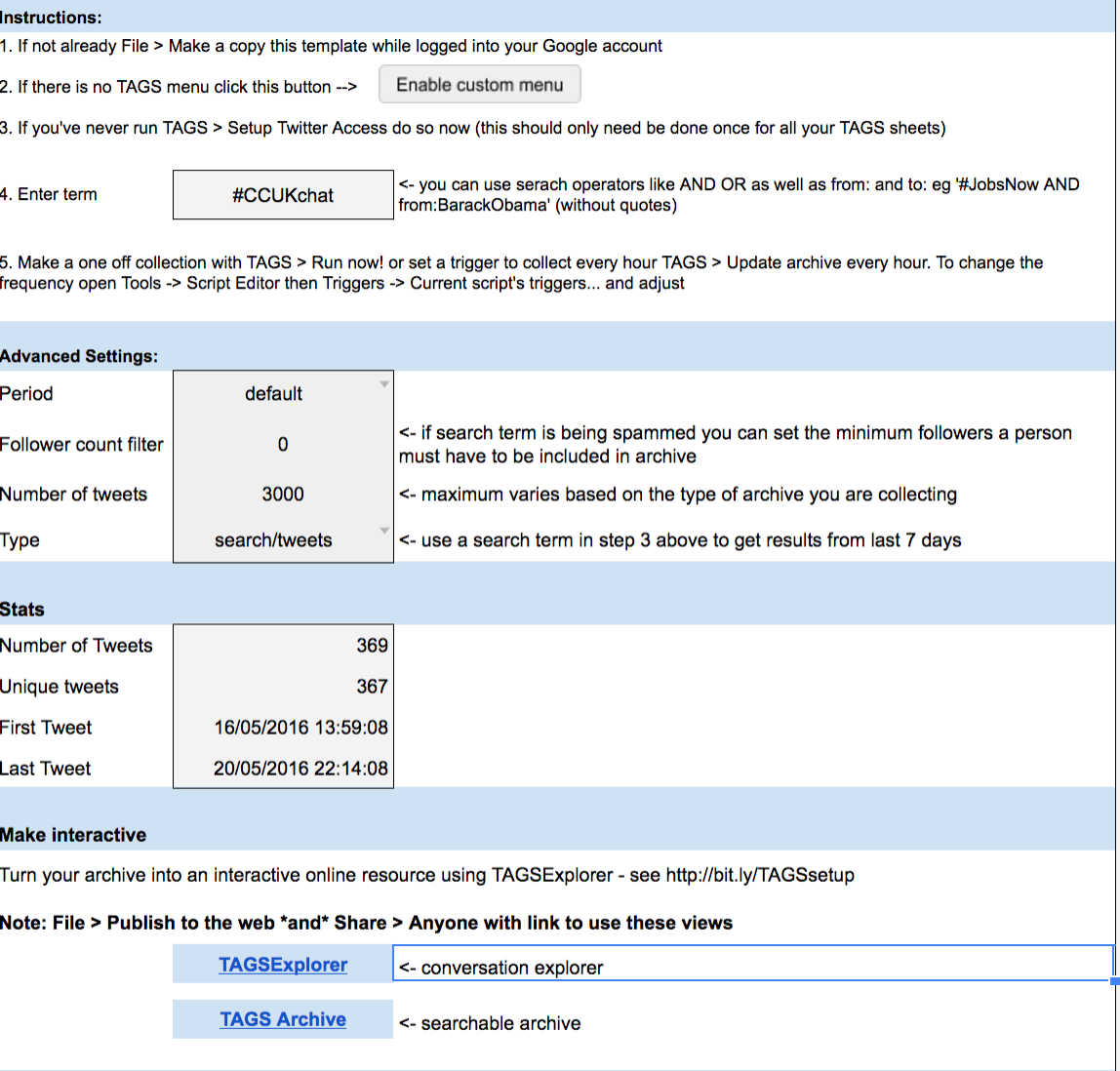


At the bottom of figure above you see two buttons at the bottom of the page, clicking on the one marked TAGSExplorer you get a URL which takes you to an interactive page with the network shown.


Clicking on retweets produced


I am still getting my head around what these show or mean. One of the tools included that is helpful can be found back in the google sheet. Under the  TAGS pull-down menu, there is an option to create a Dashboard which is an another sheet, an example is shown below.

It is informative. To add a bit of context #CCUKchat is a tweetchat that took place on the 18th May 2016 20:00-21:00 BST. The results show the spike and then a lower-level of usage after for a few days.

This is a piece of software I will be exploring more and would encourage others to have a go with themselves. There are lots of option to explore both in the template but also on the interactive network graph.


Related posts

Mapping Tweetchat #caschat over a week

Tools than can be used to create network graphs of twitter data.


All views are the authors only and do not represent those of any organisation the author may be associated with.

Saturday, 2 April 2016

Experiences with curation tools.

What does curation software mean?
The number of resources on the internet is increasing in most areas and search engines can are helpful but it is not the same as someone telling you this is a good resource. Digital curation takes this further allowing people to produce lists of internet resources that can be dynamically updated but filtered resources - if you like a dynamic reading list of web resources.

A slideshare overview.


Two free example tools are shown below Scoop.it and paper.li

1. Scoopit(http://www.scoop.it)


Two examples sites used in my teaching are shown here:
artificial intelligence for students


Robot resource


The good feature of scoop.its is you have control over what content you present, you are the filter. Content suggestions are also made, but it is up to you if you select them. The aim is to increase the amount of student suggested content. 


2. Paper.li (www.paper.li)

Allows you to set up a newspaper-like resource that takes feeds from blogs, rss feeds and if you want Twitter. Unlike scoop.it you have control over the feeds you choose but less control over the content displayed; so careful selection of the feeds is needed


Twitter
This is a quite a good system of curation by using a hashtag (e.g. #csy3025 the name of a module) you can mark-up content. It is easy and anyone contribute - that has advantages and disadvantages. Finding the curated material doesn't involving have a twitter account just a google search will find it (https://twitter.com/search?q=%23csy3025). But, you have no control over others using the hashtag anyone can use it and add their own content.


Google Docs.
This provide a good tool for an in-class activity. As an example students can create a single wiki-style resource on a topic by giving them all access to the resource for editing and then only allowing viewing access after the class. Nice, easy task that as the tutor you can contribute to as well. Now for the but; there is a danger that one or two people can investigate what happens if they delete it all - in three years this only happened once- it is relatively easy for you recover from but upsets the other students when it happens.


I am recent convert to using this tool. Adding resources into subjects by pins as below. Nice tool, very graphical showing a lot on one page.


Summary

A lot of the choice of the tool comes down to personal opinion and the role it is to play. It is worth remembering though; the use a tool is not mutually exclusive though. These often can be linked through tools such as twitter. There are many tools missing from this list; a notable one is Facebook, this can be used as well with it's pages, but I have not used in this way so I haven't included here.

An example of what other universities are doing in this area can be found at Curtin University.