Saturday, 3 September 2016

Miniproject: Micro:bit can now control a junkbot

A new direction has been developed for the junkbot project (http://junkbots.blogspot.co.uk/); previously Raspberry Pis have been used to control the junkbot’s movement (http://robotsandphysicalcomputing.blogspot.co.uk/2016/01/python-junkbot.html) – but what about the recently released Micro:Bits; can it be used to control a junkbot?

Matthew Hole, a student from Wrenn Academy, Northamptonshire ; has been investigating this idea whilst on a Nuffield Research Placement (http://www.nuffieldfoundation.org/nuffield-research-placements) working with Dr Scott Turner, University of Northampton. The project was to look into developing junkbots controlled using a Micro:bit and also to produce some materials for schools to use with or without outside assistance.


What is a Junkbot?
For this project, it is a moving ‘bot’ made from waste materials, combined with an electric motor and a programmable device (in this case a Micro:Bit) to control (or try) it. An example is shown above. More details on junkbots can be found at http://junkbots.blogspot.co.uk/


Approach used in the project.
A Micro:Bit was selected for two reasons. First, there was been a BBC supported project to give year 7 (or equivalent) students a Micro:bit (http://www.bbc.co.uk/programmes/articles/4hVG2Br1W1LKCmw8nSm9WnQ/the-bbc-micro-bit), so they are available in the schools. Secondly, Kitronik produce a motor driver board, and provide quite a bit of support for it, for the Micro:Bit (the latest version of the board can be found at https://www.kitronik.co.uk/5620-motor-driver-board-for-the-bbc-microbit-v2.html ). Using Micropython via the online editor https://www.microbit.co.uk to program the board and therefore the junkbot connected. The board with the Micro:Bit attached can be seen in the figure above carried on the junkbot.

An example piece of code is shown below:

from microbit import *

def startIt():
   pin8.write_digital(1)
   pin12.write_digital(0)
   pin0.write_digital(1)
   pin16.write_digital(0)    

def leftTurn(duration):
   pin8.write_digital(0)
   pin12.write_digital(1)
   sleep(duration)
   
def stopIt():
   pin8.write_digital(1)
   pin12.write_digital(1)
   sleep(2000)

while True:
   startIt()
   
   if button_a.is_pressed():
       leftTurn(100)
   
   if button_b.is_pressed():
       stopIt()


Suggested Resource List
  • Small Electric Motor
  • Kitronik Motor Board
  • Battery Pack
  • BBC Micro:bit
  • Pens
  • Junk (Can or Bottle)
  • Wires
  • Tape
  • Scissors
  • Broken Propeller or un-balanced load
  • Screw Driver


Related Links


Excel to build and training a single artificial neurone

Two videos produced within the Department of Computing, University of Northampton, Uk on using Microsoft Excel to simulate a single artificial neurone, as a step towards building a neural network.

In the first video, Excel is used to build and show the principles of a single neurone.


In the second video the ideas from the video above are now extended to show, in a relatively simple way, how a single neurone can be trained.


The opinion bit - I think this is a relatively easy way to start playing with neuronal ideas. What would be interesting to find a way to build this idea into a simple neural network. Comments and ideas are very welcome.

Consumable Robotics UFO lands

CBiS Education generously sent me two of their new range of robotics development kits - Consumable Robotics (consumable-robotics.com), these are a range of cardboard based kits (so far a robot and a UFO) with electronic components for example LEDs; sensors and buzzers,  depending on the kits. What makes the kits interesting though is they are designed to be controlled by either by a BBC Micro:bit or a CodeBug.

This blog documents, briefly, an initial play with the UFO kit (see below) using a Micro:Bit for control. 

The UFO model came together readily, the instructions were fairly easy to follow. Personally, a feature I especially liked about the model was the LEDs being both on the top and bottom of it - increasing it usefulness. CBiS Education.

They have also provided a webpage / portal with some example projects and code. 


My first project I built, was to pulse the LEDs on and off (one set of LEDs on Pin 0, the other on Pin 1). Pin 2 was connected to the buzzer, so produce a low buzz every few seconds. The code below is written using the Block Editor (https://www.microbit.co.uk/create-code)

The video below shows the LEDs pulsing. I do need to decorate the UFO though!


Now I am going to play with it a bit more and add the light sensor, included in the kit, to it; so it can detect different light levels. Again it is controlled using the Micro:Bit.

Stage 1 - Decorating it
The kit comes with some stickers so I added a few.

Stage 2 Wiring
Pins 0 and 1 are outputs to the LEDs
Pin 2 is the input from the light sensor
The red lead from the light sensor connects to 3v and the grounds to the ground.


Stage 3 Code

The light sensor works more as a low light level detector, the darker the higher the value returned (in this case) on pin 2. So in low light level,  the LEDs flash relatively quickly, when the light level rises half of the LEDs start to pulse more slowly.


All opinions in this blog are the Author's and should not in any way be seen as reflecting the views of any organisation the Author has any association with.

Sunday, 12 June 2016

STEAM champions: Simone Giertz

Science, Technology, Engineering, Arts and Maths (STEAM) is a passion and I would like to do a short series of occasional blog posts about some of those I think are making a difference in this area. Strangely they are not all going to be scientists in the traditional sense.

To start with Simone Giertz whose videos often go viral and has been nicknamed the Queen of Sh***y robots. Hint the language is a little strong for some people - Parental Advice warning. 

The robots are fun and mix many elements together. Here is a sample of the videos.


All views in the blog (but not the videos) as the authors.

Saturday, 21 May 2016

Social Network analysis 2- informative but fun

Previously I have been playing with a piece of Social Network Analysis software Socioviz.net and some the results can be seen in an earlier post (http://scottjturnerranting.blogspot.co.uk/2015/12/social-network-analysis-fun-and.html).

This week I have been playing with another free Social Network Analysis software  - TAGs from Martin Hawksey (Twitter: @mhawksey). 
The software is available from https://tags.hawksey.info/ and provides, among other things, a way of collecting Twitter data into a Google Sheet document via a template. How it is set up is on the site (https://tags.hawksey.info/) and especially useful is the video  on the site, that I have also embedded below.


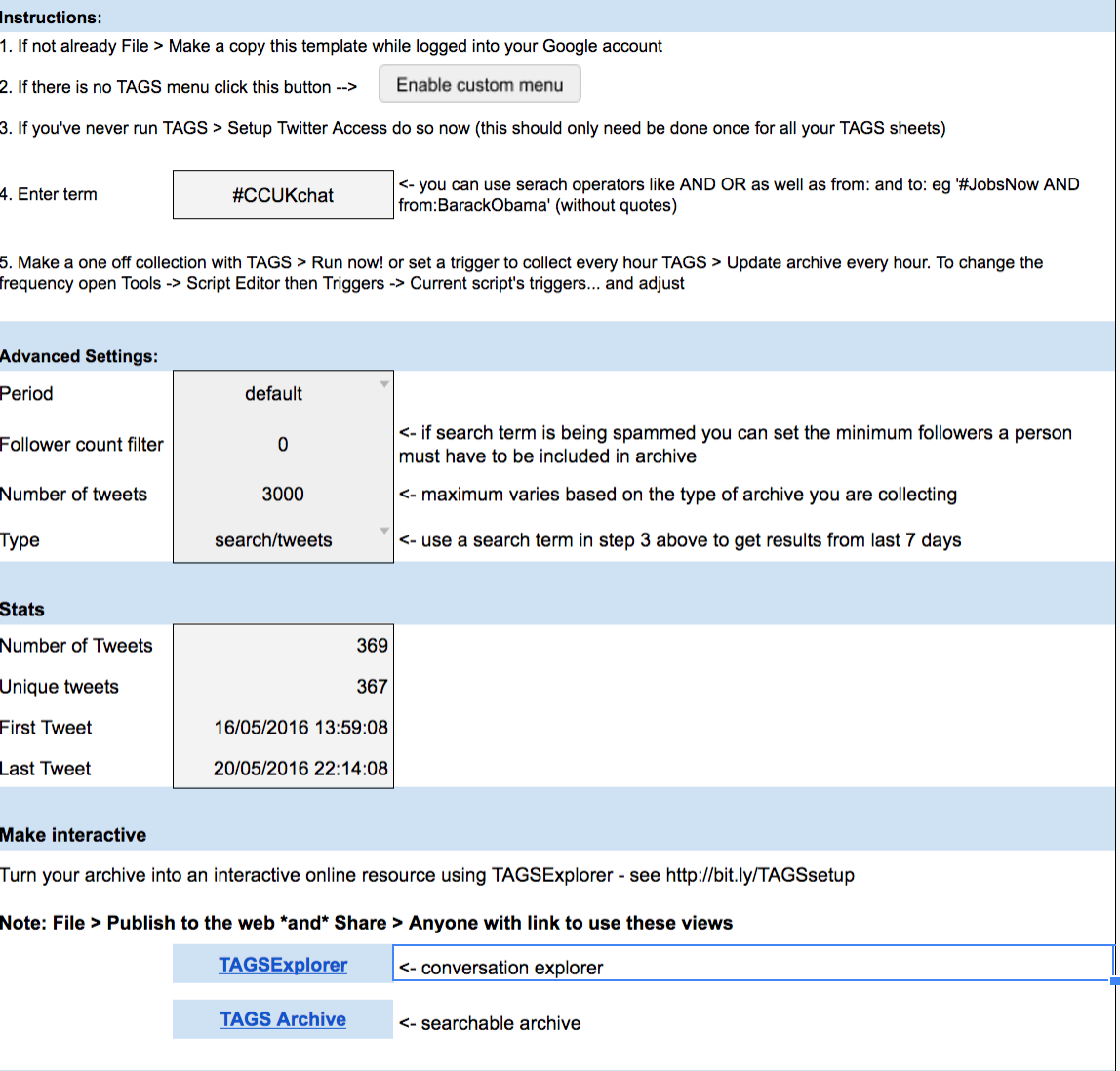
As an experiment I was curious about the network of twitter users using the hashtag #CCUKchat this week; so it seemed like a good opportunity to try it. The filled in template for this task (after the set-up procedure is completed) is shown below, it was then run (an option that is found in the TAGS pull-down menu that will have been created during the set-up operation).


At the bottom of figure above you see two buttons at the bottom of the page, clicking on the one marked TAGSExplorer you get a URL which takes you to an interactive page with the network shown.


Clicking on retweets produced


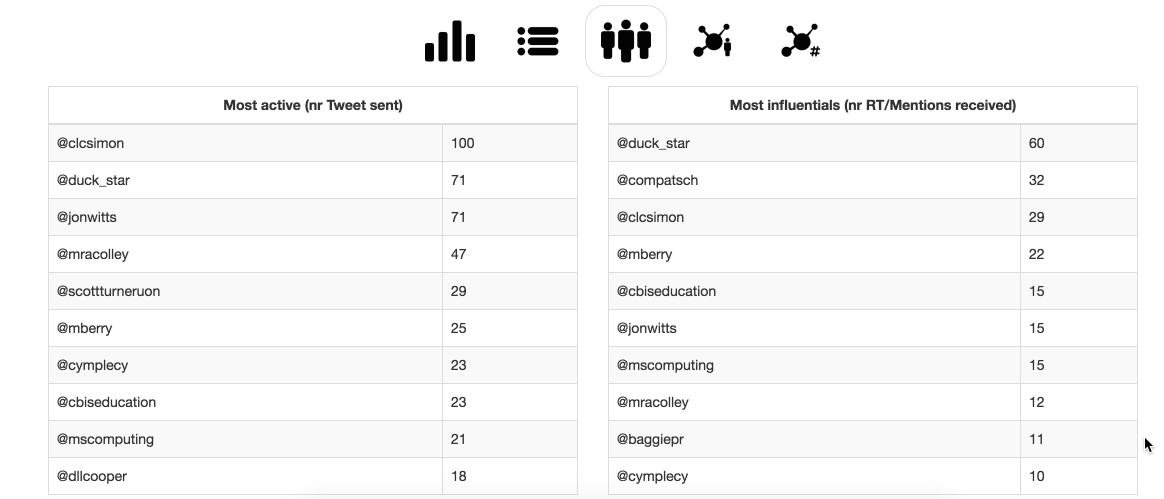
I am still getting my head around what these show or mean. One of the tools included that is helpful can be found back in the google sheet. Under the  TAGS pull-down menu, there is an option to create a Dashboard which is an another sheet, an example is shown below.

It is informative. To add a bit of context #CCUKchat is a tweetchat that took place on the 18th May 2016 20:00-21:00 BST. The results show the spike and then a lower-level of usage after for a few days.

This is a piece of software I will be exploring more and would encourage others to have a go with themselves. There are lots of option to explore both in the template but also on the interactive network graph.


Related posts

Mapping Tweetchat #caschat over a week

Tools than can be used to create network graphs of twitter data.


All views are the authors only and do not represent those of any organisation the author may be associated with.

Saturday, 2 April 2016

Experiences with curation tools.

What does curation software mean?
The number of resources on the internet is increasing in most areas and search engines can are helpful but it is not the same as someone telling you this is a good resource. Digital curation takes this further allowing people to produce lists of internet resources that can be dynamically updated but filtered resources - if you like a dynamic reading list of web resources.

A slideshare overview.


Two free example tools are shown below Scoop.it and paper.li

1. Scoopit(http://www.scoop.it)


Two examples sites used in my teaching are shown here:
artificial intelligence for students


Robot resource


The good feature of scoop.its is you have control over what content you present, you are the filter. Content suggestions are also made, but it is up to you if you select them. The aim is to increase the amount of student suggested content. 


2. Paper.li (www.paper.li)

Allows you to set up a newspaper-like resource that takes feeds from blogs, rss feeds and if you want Twitter. Unlike scoop.it you have control over the feeds you choose but less control over the content displayed; so careful selection of the feeds is needed


Twitter
This is a quite a good system of curation by using a hashtag (e.g. #csy3025 the name of a module) you can mark-up content. It is easy and anyone contribute - that has advantages and disadvantages. Finding the curated material doesn't involving have a twitter account just a google search will find it (https://twitter.com/search?q=%23csy3025). But, you have no control over others using the hashtag anyone can use it and add their own content.


Google Docs.
This provide a good tool for an in-class activity. As an example students can create a single wiki-style resource on a topic by giving them all access to the resource for editing and then only allowing viewing access after the class. Nice, easy task that as the tutor you can contribute to as well. Now for the but; there is a danger that one or two people can investigate what happens if they delete it all - in three years this only happened once- it is relatively easy for you recover from but upsets the other students when it happens.


I am recent convert to using this tool. Adding resources into subjects by pins as below. Nice tool, very graphical showing a lot on one page.


Summary

A lot of the choice of the tool comes down to personal opinion and the role it is to play. It is worth remembering though; the use a tool is not mutually exclusive though. These often can be linked through tools such as twitter. There are many tools missing from this list; a notable one is Facebook, this can be used as well with it's pages, but I have not used in this way so I haven't included here.

An example of what other universities are doing in this area can be found at Curtin University.

Wednesday, 23 March 2016

Mapping Tweetchat #caschat over a week

Using socioviz.net looked at the use of a particular weekly tweetchat hashtag #caschat over a one week period 16th March 2016 to 22nd March 2016. The chat happened on 22nd March 2016 discussing Robots in Teaching.


The table above (and the graph below) give an indication on the active use of the hashtag during the week, along with the level of engagement from others shown in the influence score.


 The above figure shows all those who used the hashtag or were referred to in tweets using the hashtag during the week. A large central group and smaller outlier groups.


Focusing of the central group, I would suggest there is different behaviours occurring. One of which  in the centre there is a central discussion very interconnected; apart from this there may be spun off conversations happening as well. The 'leaves' on the outside are mostly likely to people being mentioned but with some evidence that some then get involved.